
⚠️ IMPORTANT:
The Etsy app currently does NOT support Etsy downloads.
You cannot download your files through the Etsy app.
Please open Etsy in your web browser – whether on your phone, tablet, or computer.
You have two options:
Option 1: Via the link in your email
Open the confirmation email from Etsy and tap the download link.
Important: if you have the Etsy app installed, the link will try to open it instead of your browser. Tap the “X” to close the app and choose “Open in browser.”
Option 2: Via your Etsy account
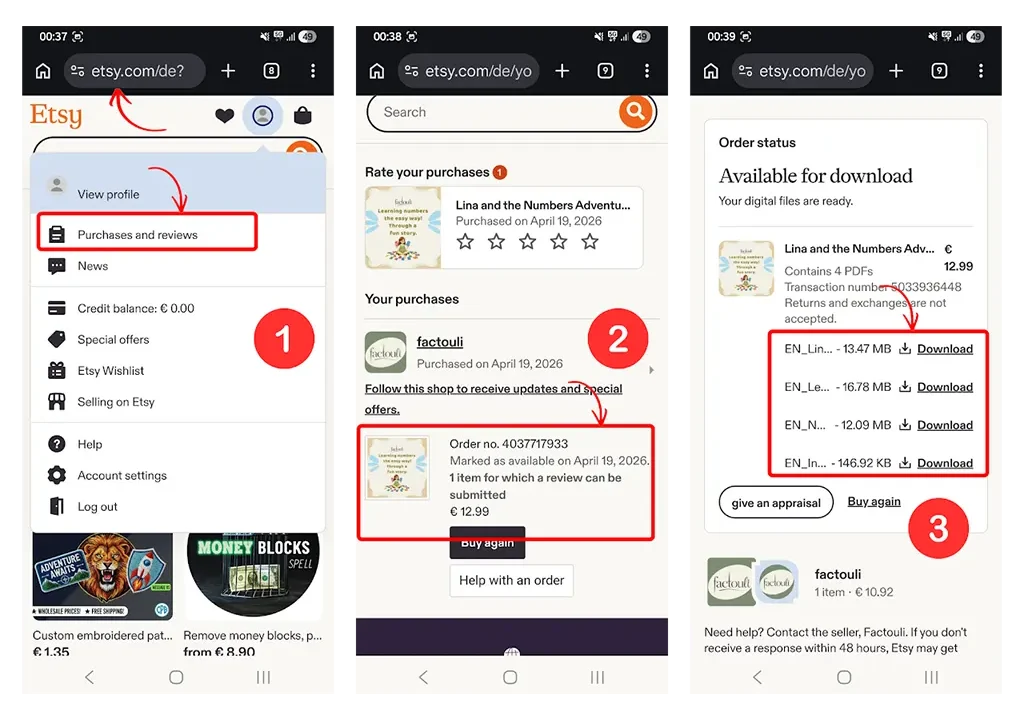
Open etsy.com in your mobile browser and log in.
Tap on your profile picture at the top.
Select “Purchases and reviews”.
Tap on your order from factouli.
You will now see the order details. Tap on the order to open it.
All download links will appear. Tap “Download” next to each file.
📂 Where can I find the file after downloading?
Android (Chrome & Samsung Browser):
Tap the three dots in the top right corner of the browser → “Downloads.”
Or open the “Downloads” folder directly on your phone.
iPhone/iPad (Safari):
When you tap “Download,” your iPhone will first ask you where you want to save the file.
Choose a location you can remember – for example, “Files” → “Downloads.”
You will find it there afterwards.
💡 Tip:
You can download your files from Etsy again at any time – they won’t get lost!
If you use Google Drive or iCloud, we recommend saving the files there. That way, you’ll have them ready on every device.
You have two ways to access your files:
Option 1: Via the link in your email
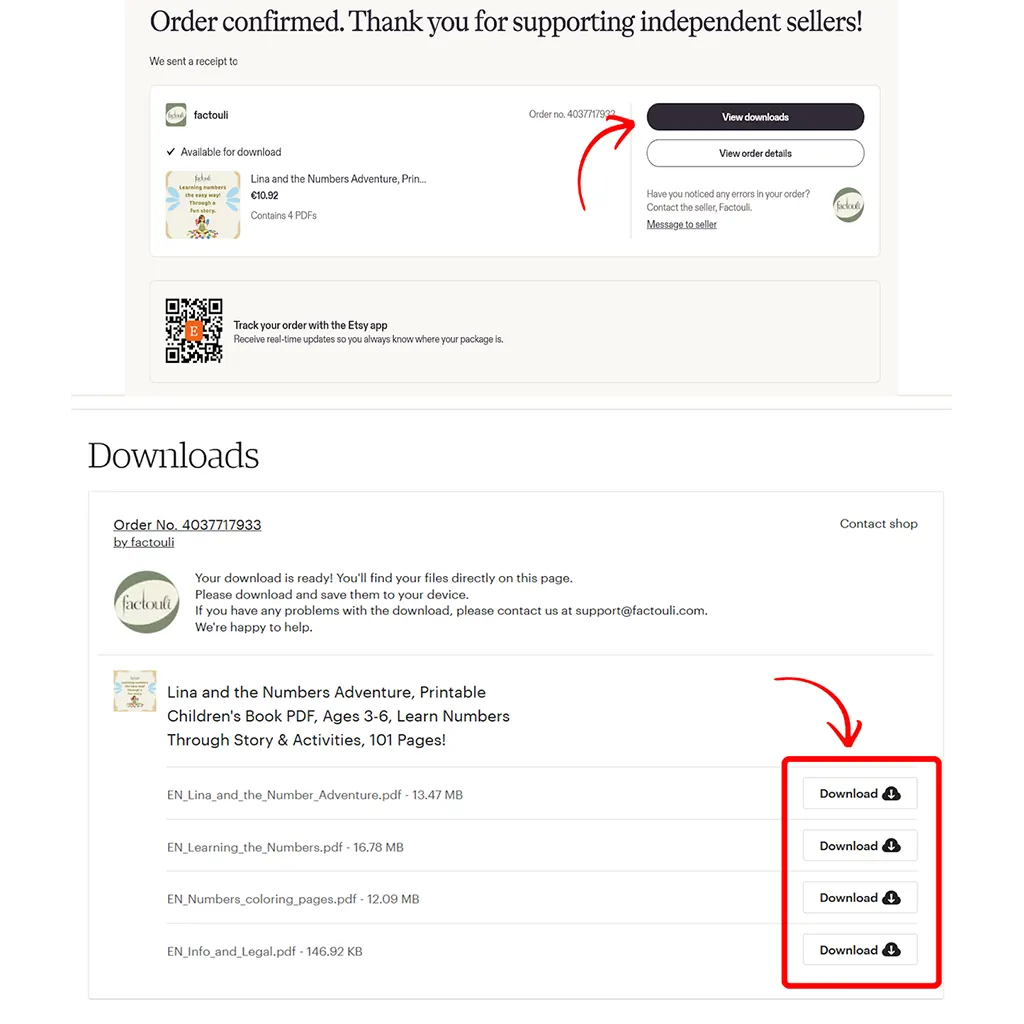
After your purchase, you will receive a confirmation email from Etsy.
Click the download link in the email – it will take you directly to your files.
Option 2: Via your Etsy account
Go to etsy.com in your browser and log in.
Click on your profile picture in the top right corner.
Select “Purchases and reviews”.
Find your order from factouli and click on it.
You will now see all your files. Click “Download” next to each file.
📂 Where can I find the file after downloading?
Windows: In the “Downloads” folder.
Mac: In the “Downloads” folder or at the top of your browser bar.
💡 Tip:
You can download your files from Etsy again at any time – they won’t get lost!
If you use Google Drive or iCloud, we recommend saving the files there. That way, you’ll have them ready on every device.
Check your spam folder first, and search for transaction@etsy.com. Automatic messages often end up there.
If it’s still missing, there may be a typo in the address you used at checkout, especially if you checked out as a guest. We can’t see or correct your email address, so Etsy Support is the only place that can fix it.
Either way, you don’t need the email. If you have an Etsy account, your files are always waiting for you in the steps above.
Still can’t find your files? Get in touch and we’ll send them to you directly.